XTRAC User Guide

|
XTRAC User Guide |
|
The Attachments and Communications section lets you view document attachments and customer communications associated with the work item. The number on the Attachments icon indicates the number of attachments associated with the work item.
You cannot add new attachments or communications to the work item.
To view attachments and communications:
| 1. | At the top of the Work Item Preview pane, click  . . |
The focus shifts to the Attachments and Communications section of the Work Item Preview pane. Document attachments are listed under the Work Item Attachments heading. Communications are listed under the Customer Communications heading.
| 2. | To view an attachment or communication, click the document's name and follow the screen prompts to determine which application to use to open it. |
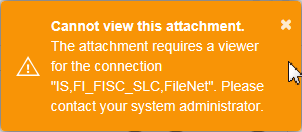
Note: If you do not have a viewer or app installed that can open the document type, you will get an error message indicating that you cannot view the attachment. Contact your XTRAC system administrator.
| Item | Description |
|---|---|

|
Indicates the number of attachments associated with this work item. |

|
Indicates the number of communications associated with this work item. |
|
|
Move back to the top of the Work Item Preview pane. |
XTRAC Community |

|
